PiCanvas — Infinite Possibilities in One Web Part #239

Description

Submission Name
PiCanvas — Infinite Possibilities in One Web Part
Description
For the last 25 years, there's been a hard line between the people who manage SharePoint and the people who code for it. PiCanvas is what happens when that line disappears.
I'm a SharePoint administrator at SAP — not a developer. When our People & Culture team needed a way to organize a painfully long SharePoint page into tabs, the only community solution available was built on SPFx 1.13 and wouldn't pass our security scans. So on a Friday afternoon, with 75 minutes before picking up my son, I used AI-assisted development to upgrade it, add features, run it through SAP's security scanning, and deploy it to production. That was a few months ago. I haven't stopped building since.
What PiCanvas Does
PiCanvas is a single SPFx web part that organizes SharePoint content into flexible, fully customizable tabbed layouts — with 12 content types (and counting), enterprise-grade security, and a configuration experience that goes far beyond what any existing tab solution offers.
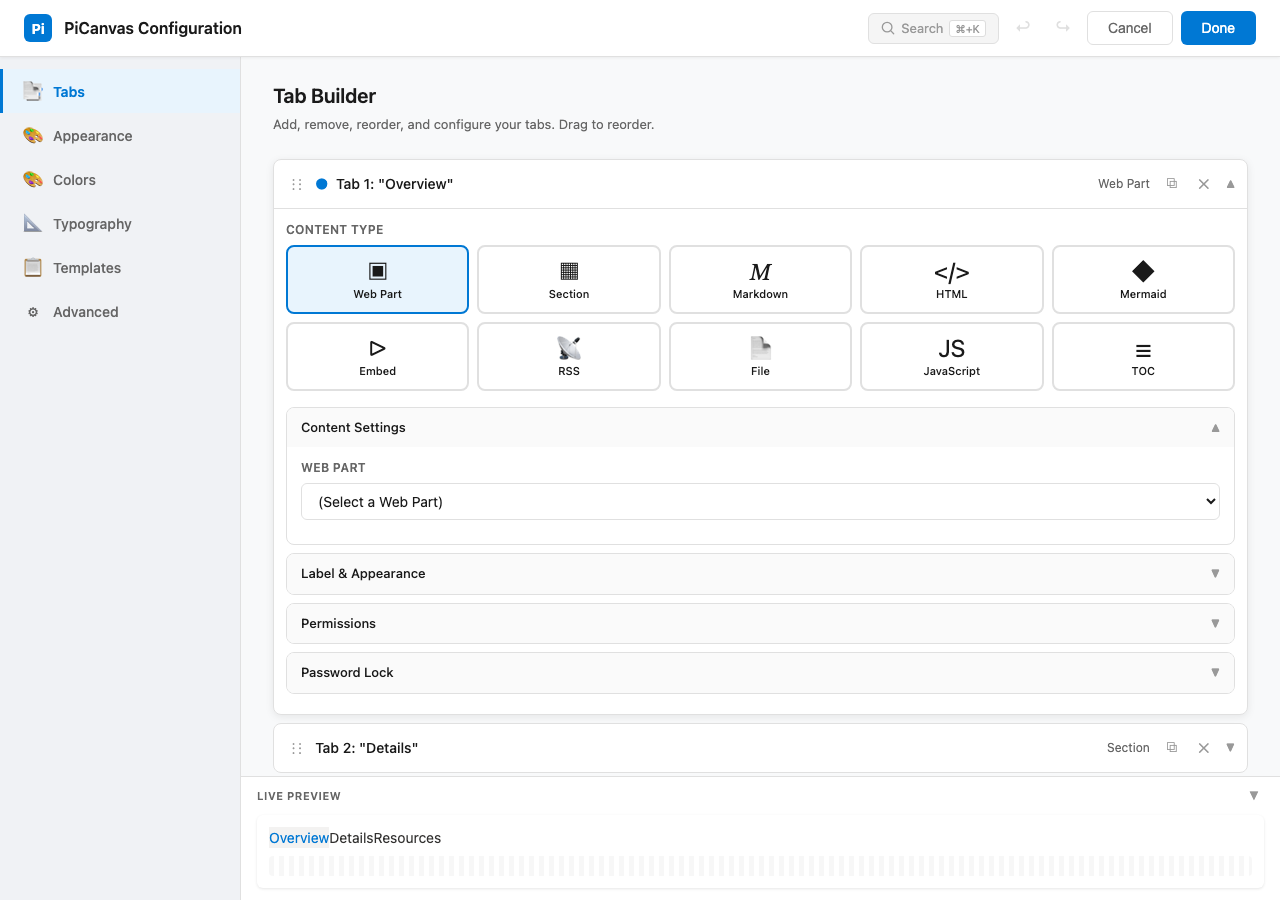
12 Content Types in One Web Part
| Content Type | What It Does |
|---|---|
| Web Part | Any native SharePoint web part inside a tab |
| Section | Entire multi-column SharePoint sections grouped into tabs — each tab is its own mini-page |
| Markdown | GitHub Flavored Markdown with syntax highlighting |
| HTML | Sanitized HTML content (DOMPurify-protected) |
| Mermaid | Diagrams, flowcharts, and architecture visualizations |
| Embed | iframes for YouTube, Power BI, Forms, Vimeo — with domain whitelist |
| RSS | Feed reader with list, card, and compact layouts |
| File | External .html or .md files from SharePoint document libraries |
| JavaScript | Custom template execution with sandboxed API |
| TOC | Auto-generated Table of Contents from page headings |
| Profile Report | Company intelligence dashboards |
| GitHub | Native GitHub repo rendering via API — built when iframe embedding was blocked by CSP (newest) |
Full-Screen Configuration Panel
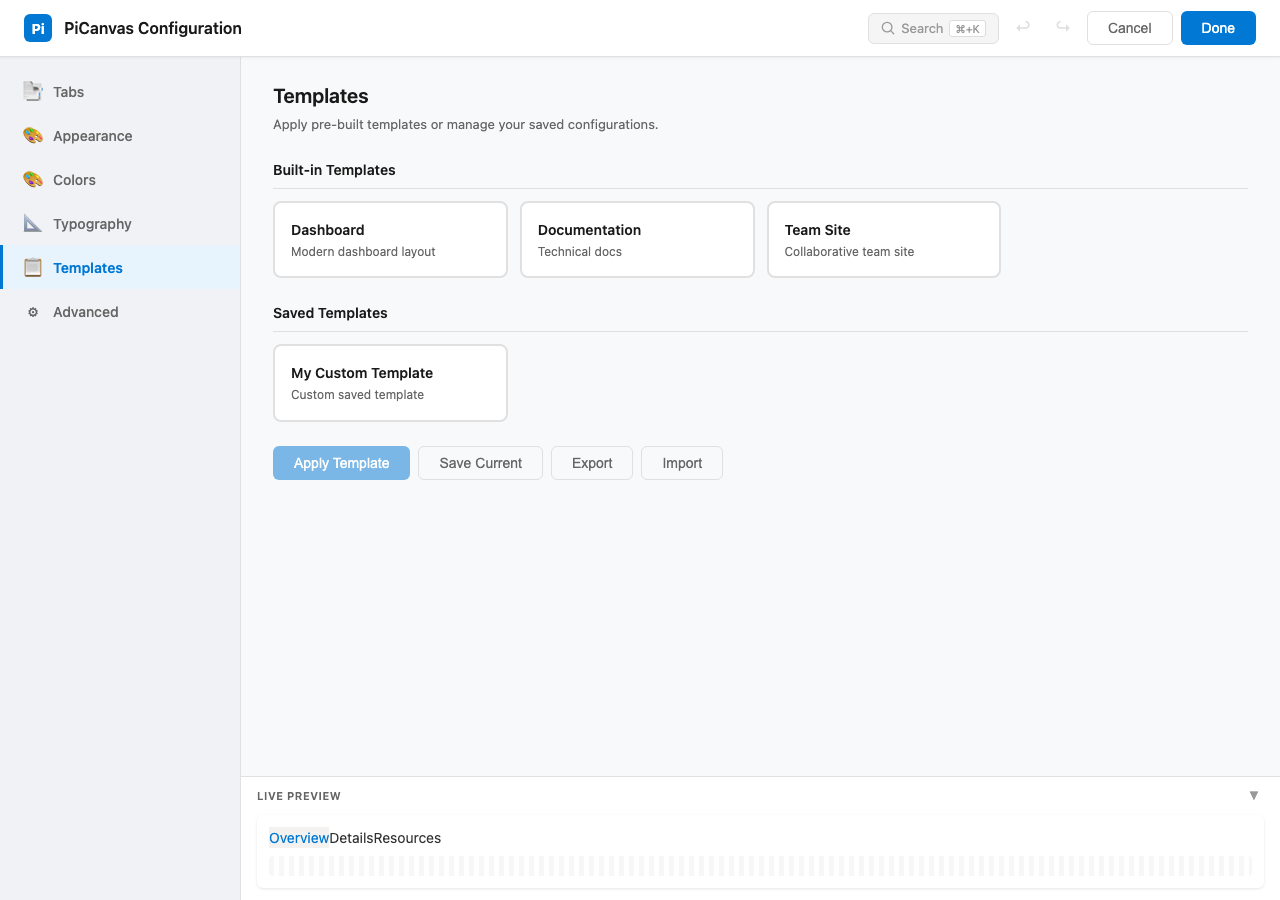
PiCanvas replaces the standard property pane with a full-screen configuration experience — tab builder with drag-and-drop, appearance controls, a color engine with 6 pickers, typography settings, border/shadow/transition controls, and a template system for export/import.
Enterprise Features
- Permission-Based Tab Visibility — Show/hide individual tabs by SharePoint group (Owners, Members, Visitors, custom groups). Same page, different experience per audience.
- Password-Protected Tabs — Lock individual tabs with hashed passwords (bcrypt-style). Customizable lock screen UI.
- Templates — Save, export, and import full configurations. Built-in templates for common layouts. Teams build their own template libraries.
- Application Customizer Extension — Pre-hides content before page render to eliminate flash of unstyled content.
- Deep Linking — URL hash navigation (#tab-name) for direct links to specific tabs.
- Lazy Loading — Tab content loads on demand for performance.
- Theme Awareness — Auto-detects light/dark mode with 25+ CSS custom properties for full theming control.
Styling & Customization
4 tab styles (default, pills, underline, boxed) × 4 alignments × horizontal/vertical orientation. Up to 20 tabs per instance. Web parts or images as tab labels. Tab dividers. Colored glows. Everything is customizable — this isn't a rigid component, it's a design system.
The Technical Foundation
- SPFx 1.22 — Latest version, Heft build toolchain, TypeScript 5.6
- Service Architecture — Dedicated services for content rendering, permissions, theming, templates, tab locking, metadata tokens, TOC generation, RSS parsing, and more
- Security — DOMPurify for HTML sanitization, domain whitelist for embeds, SAP's full security scanning and code review passed
- Zero deprecated dependencies — Modern ESLint, current packages throughout
In Production at SAP
PiCanvas is not a proof of concept. It is deployed and actively used at SAP for:
- People & Culture initiative pages — The original use case. Long pages reorganized into tabbed experiences.
- Travel resource hubs — Policies, forms, and booking tools organized by region with permission-based visibility.
- Full-stack applications built entirely on SharePoint — This is where PiCanvas goes beyond tabs.
Full-Stack SharePoint: Lists as Database, Libraries as File System, PiCanvas as Frontend
One of the most advanced deployments uses PiCanvas to power a complete application with zero external infrastructure — no Azure Functions, no external databases, no additional servers:
| Layer | SharePoint Feature | Role |
|---|---|---|
| Database | SharePoint List | Tens of thousands of structured items with relational IDs, person columns for ownership, rich metadata fields, and JSON columns for structured intelligence data |
| File System | Document Library | Organized folder hierarchy (12+ content folders) with files linked back to list items through a unique ID naming convention — enabling relational lookups across lists and libraries |
| API | SharePoint REST + Microsoft Graph | ProfileReportService queries lists with pagination (handling 50K+ items via @odata.nextLink), loads 9+ file types per record in parallel using Promise.allSettled, and connects to Graph for live data |
| Access Control | SharePoint Groups + Permissions | Permission-based tab visibility ensures different users see different views. Person columns on list items enable ownership-based filtering. No duplicate pages needed. |
| Frontend | PiCanvas Web Part | Renders everything — list data in tabs, library files as content, interactive reports, live feeds — with a JavaScript sandbox API (graphFetch, httpFetch) for custom rendering and Graph connectivity |
The result is a production application that leverages SharePoint's built-in infrastructure — security, versioning, search, permissions, storage — without bolting on external services. PiCanvas turns SharePoint from a content platform into an application platform.
The Vibe Coding Story
This project was built almost entirely through AI-assisted development — GitHub Copilot and Claude Code as coding partners. I'm a SharePoint admin who spent years as the bridge between developers and end users. That perspective — knowing what people need and how the platform works — combined with AI tooling, is what made PiCanvas possible.
Case in point: while prepping this hackathon submission, I wanted to display the GitHub repo right inside SharePoint — in a PiCanvas tab. But GitHub blocks iframe embedding via Content Security Policy. So I did what I've been doing this entire time — I vibe coded a new content type. A GitHub renderer that pulls repo data through the GitHub API and displays it natively inside PiCanvas. Built it, tested it, deployed it. That's content type number twelve. When you hit a wall, you don't file a ticket — you just build it.
AI didn't replace a developer here. It created one.
Open Source & Community
PiCanvas is accepted into the PnP Sample Gallery and is MIT licensed. The code is on GitHub — fork it, extend it, take pieces of it.
Originally based on Mark Rackley's Hillbilly Tabs, PiCanvas v2+ is a complete modernization — upgraded from SPFx 1.13 to 1.22, with 12 content types, a full configuration panel, enterprise security, and a template system that didn't exist in the original.
Submission Categories
- SharePoint site
- Mobile experience
- Knowledge Agent
- Agents and SharePoint
- SharePoint Framework
- SharePoint Embedded
Project video
https://pispace.sharepoint.com/:v:/s/PiCanvas/IQAPzsOMHzBwRL6SXgkDWgA8AUzFhhrW9U6-qIShkcCz0wc
Project Repository URL
https://github.com/anthonyrhopkins/PiCanvas
Team Members
anthonyrhopkins
LinkedIn Profiles
https://www.linkedin.com/in/anthonyrhopkins
Badge validation
- I verify that all of my team members have completed the badge validation form at aka.ms/SharePointHackathon/Badges.