 Trilium Next
(Feature request) How do I reference a local image instead of inlaying it? #7356


-
Describe featureI have a lot of images in my notes, and embedding them would really take up the size of the notes. Can I store these images somewhere locally and then reference them in my notes? How do I do this? Additional InformationNo response |
Beta Was this translation helpful? Give feedback.
Replies: 7 comments

-
|
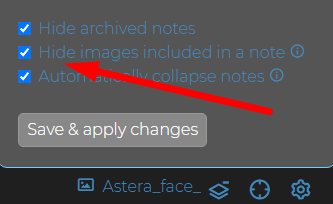
That is actually the only way how image notes work in Trilium as of now. When you paste an image inside a text note - an image type child note is being created and a reference to that note gets pasted into the text note. You can go to the image note (by clicking on the image reference for example) and "copy reference to clipboard", which you can then paste anywhere you like as well. Image notes that are referenced in their parent text note are hidden by default, but you can change this here: |

Beta Was this translation helpful? Give feedback.
-
I mean, instead of embedding the image into the database, it is similar to the Markdown format, where the picture is stored locally, but can they be referenced through the path? I am now going to install a drawing bed in wsl to call,Here I clicked on him and then copied the reference to the clipboard just copied the image, I was trying to modify its location so that he was not stored in the database |
Beta Was this translation helpful? Give feedback.

-
|
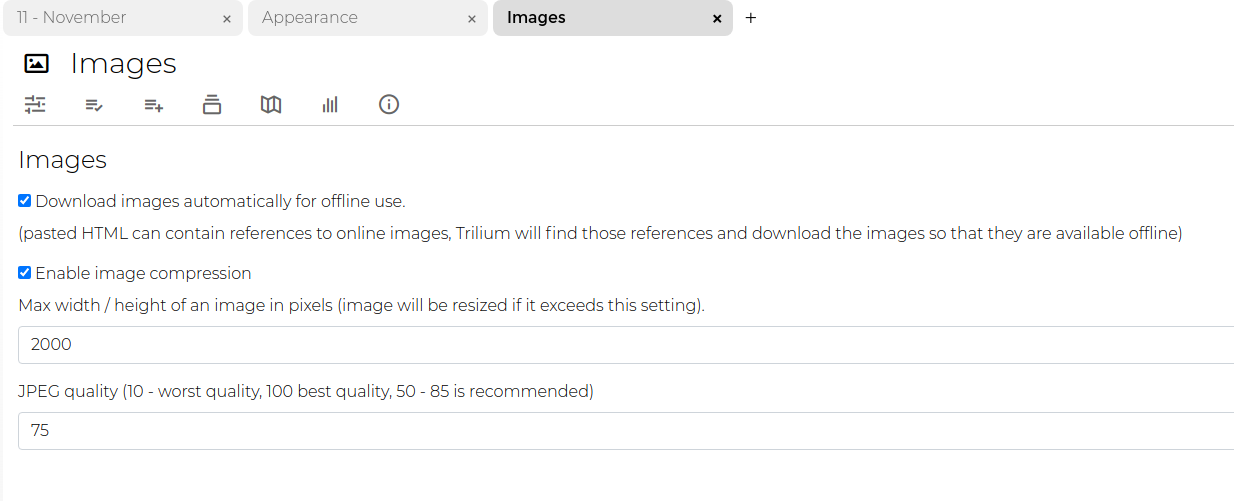
Trilium by default attempts to download all images locally so they are available offline. You can disable this in options:
If you disable this and paste a image reference, then only the reference will be used. |

Beta Was this translation helpful? Give feedback.
-
That means as long as this option is turned off, then when I copy the local image in, it's not set into the database, but just like a Markdown reference image? Thank you very much for your answer, tr is the best note taking software I have ever used! |
Beta Was this translation helpful? Give feedback.
-
Yes. But it depends on what is in the clipboard. In some cases the clipboard contains the actual bitmap and the image URL, in such a case the image is still stored in the database. But normally when you copy from e.g. browser, only the reference is in the clipboard and then it won't be stored in DB. |
Beta Was this translation helpful? Give feedback.
-
Got it. Thank you very much. |
Beta Was this translation helpful? Give feedback.

-
|
Images are now saved as attachments, so they will no longer appear as part of the tree. |
Beta Was this translation helpful? Give feedback.


Images are now saved as attachments, so they will no longer appear as part of the tree.