ClockworkPi uConsole becomes a powerful split tunnel WireGuard VPN router with dual WiFi interfaces.

This project provides a complete configuration to turn your uConsole (Raspberry Pi CM4) into a feature-rich router that handles all traffic through a split tunnel WireGuard VPN with advanced QoS, traffic shaping, and network optimization tweaks.
[Client Devices] ⇄ wlan0 ⇄ [uConsole Router → wg0 → VPS] ⇄ Internet
    ↑
wlan1 (WAN)
Traffic enters through an Alfa AWUS036ACS (wlan1) interface, passes through WireGuard VPN (wg0), and exits securely via remote VPS.
Internal CM4 Wi-Fi (wlan0) provides a local access point for connected devices, while CAKE QoS, BBR TCP congestion control, and our custom throttling script maximize throughput and prevent ISP-side rate limiting.
Firewalld handles NAT and network security, and Avahi mDNS provides seamless zero-configuration device discovery.
- ClockworkPi uConsole-Kit-RPI-CM4-Lite
- Alfa AWUS036ACS USB WiFi Adapter for internet hotspot connection (May require driver compilation - see notes below)
- VPS/Server for WireGuard endpoint
- Optional: stub antenna mount - uConsole micro antenna mount STL files
- Base: Debian 12 Bookworm and ClockworkPi repositories
- Distro: Kali GNU/Linux Rolling 2025.3 — Kali for uConsole / DevTerm (ClockworkPi Forum)
- Host: Custom uConsole ARM64 configuration with Raspberry Pi Compute Module 4 Rev 1.1
- Kernel: Any compatible ARM64 kernel (we used 5.10.17-v8+)
- WireGuard VPN – Modern VPN protocol offering fast, lightweight, and encrypted end-to-end tunneling
- NAT Masquerade - Network Address Translation allows all local clients to share a single VPN connection
- Firewalld - Dynamic firewall management with zone-based secure network traffic control
- dnsmasq – Lightweight DHCP and DNS server managing IP assignment and name resolution for AP clients
- BBR TCP Congestion Control - Google's algorithm for high-throughput, low-latency TCP performance
- CAKE QoS - Advanced bufferbloat mitigation with intelligent traffic shaping
- Avahi mDNS – Zero-configuration device discovery
- Cyberdeck Color Dashboard - Our own custom real-time monitoring GUI
Built on a custom uConsole ARM64 configuration running Kali GNU/Linux Rolling 2025.3 (Debian 12 Bookworm base), this project transforms the ClockworkPi uConsole into a compact, high-performance VPN router. It integrates a dual-WiFi interface design — one for upstream WAN and another as a local access point — while routing all traffic through a WireGuard VPN tunnel.
Advanced network optimization features such as CAKE QoS, BBR TCP congestion control, and firewalld-based NAT routing ensure consistently low latency and efficient throughput, even under heavy load. In fact, the system’s performance exceeded typical consumer bandwidth limits during testing, requiring the implementation of a custom throttling script to avoid triggering ISP-side rate-limiting and connection resets!
We had our router running for several months without issue, always keeping an SSH window to the uConsole open for monitoring, or an occasional reset (using the following command):
sudo nmcli connection down rpi-cm4
sudo nmcli connection up rpi-cm4
This came in handy when using curl and other commands to test our iOS project's backend (running independently on the same VPS we use for WireGuard). Over time the uConsole had become an integral part of our iOS development workflow. With this setup we were fine just using the CLI, but when we decided to share our work, we added a custom GUI monitoring dashboard using system colors and a minimalist design, opting for a cyberdeck aesthetic that's both lightweight and functional — a fun way to provide real-time visibility into network interfaces, VPN status, throughput, and QoS metrics, making it perfect for both field use and as a complement to our desktop.
Designed to be fully persistent, the router retains all configuration settings across reboots, supports fallback Ethernet connectivity, and includes mDNS for zero-configuration device discovery.
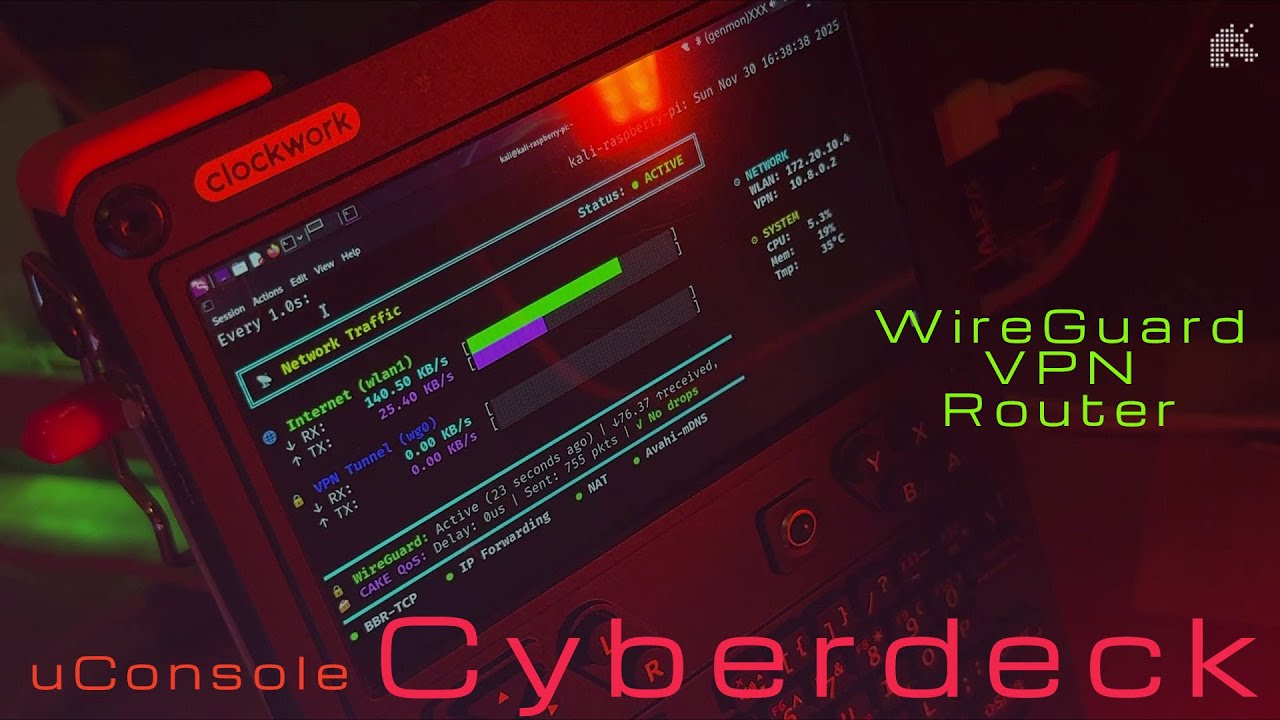
This repository was created as a companion to the video tutorial covering:
- uConsole router configuration
- Cyberdeck_Dashboard usage and monitoring
Note: It is assumed the reader will have already done the following before begining:
- uConsole hardware assembly and stub antenna mounting (skip if using the included adhesive strip antenna)
- Kali Linux installation and update
- Alfa AWUS036ACS driver setup
# Kali Linux ARM installation on uConsole CM4
# Alfa AWUS036ACS USB adapter connected
# VPS with WireGuard server configured# 1. Install required packages
sudo apt update && sudo apt install -y \
wireguard-tools iproute2 iptables \
iptables-persistent avahi-daemon dnsmasq network-manager
# 2. Clone this repository
git clone https://github.com/yourusername/uconsole-wireguard-router.git
cd uconsole-wireguard-router
# 3. Follow the complete setup guide
# See ROUTER-complete-setup.md for detailed instructions- Network interface configurations
- WireGuard VPN setup
- Firewall rules (iptables)
- CAKE QoS systemd service
- DNS/DHCP server configs
- Dashboard monitoring script
- ROUTER-complete-setup.md - Complete step-by-step setup guide
- TROUBLESHOOTING.md - Common issues and solutions (to be added)
This router configuration was developed and tested on kernel 5.10.17-v8+ (ARM64, SMP PREEMPT) for compatability with other source built apps (SavvyCAN in particular), but should work on any modern ARM64 kernel for the Raspberry Pi CM4.
For our build using a custom kernel, our Alfa AWUS036ACS Wi-Fi driver needed to be compiled from source:
For most users: Modern kernels (5.15+) may have driver support right out of the box. If your Alfa adapter isn't recognized automatically, you may need to compile the driver- see your kernel version's documentation.
The router configuration itself is kernel-agnostic. All features (WireGuard, CAKE QoS, BBR, etc.) are available in standard Raspberry Pi OS and Kali Linux kernels. You do not need to build a custom kernel to use this router setup.
The included monitoring dashboard script (cyberdeck_dashboard.sh) provides real-time visualization of:
- Active network interfaces
- WireGuard tunnel status
- Traffic statistics
- QoS metrics
- Connection speeds
- System resources
# Run the dashboard
./cyberdeck_dashboard.shWith this setup you get:
- Low latency Optimized using BBR TCP congestion control for smooth and responsive connections
- Stable connections CAKE QoS mitigates bufferbloat and prioritizes traffic effectively
- High throughput Efficient NAT and VPN routing ensure minimal bottlenecks
- Reliable failover Multiple WAN interfaces allow automatic switching if the primary link fails
- Throttling management Custom script prevents ISP-triggered rate limiting during high-speed operation
- Real-time monitoring Dashboard provides instant feedback on throughput, interface status, and QoS metrics
- Encrypted traffic – All client data is securely routed through WireGuard VPN
- Firewall protection – Firewalld rules prevent leaks outside the VPN tunnel and isolate network zones
- Traffic integrity – TCPMSS clamping ensures proper MTU handling for all clients
- Configurable zones – Separate rules for WAN, LAN, and VPN interfaces for granular security
- Zero-trust discovery – Avahi mDNS enables safe device discovery without exposing sensitive services
- Persistence – Security configurations survive reboots for continuous protection
Contributions welcome! Feel free to:
- Submit issues for bugs or questions
- Propose further enhancements
- Share your modifications
- Help us improve documentation
MIT License - See LICENSE file for details
- ClockworkPi — for the awesome uConsole hardware
- WireGuard — fast, modern, and secure VPN protocol
- Google BBR — high-performance TCP congestion control algorithm
- Avahi — open-source mDNS and zero-configuration networking
- CAKE QoS — advanced queue management and bufferbloat control
- Firewalld — dynamic firewall management with zone-based security
- dnsmasq — lightweight DNS and DHCP server
- Alfa Network — reliable USB WiFi adapters
- REX - invaluable ClockworkPi OS build support on uConsole - DevTerm community forum
- Kali Linux — rolling-release security distro with ARM support
- Debian Project — Bookworm base system foundation
- Raspberry Pi is a trademark of Raspberry Pi Ltd
Questions? Check the video tutorial or open an issue!