A contribution to Haystack tutorials may be anything from a suggestion for edits or a new tutorial request to adding a new tutorial or editing an existing one yourself.
To make a request for a new tutorial or to suggest edits and fixes, submit an issue and choose the appropriate type:
-
Bug report: For any edit suggestions or bug reports.
-
New Tutorial Request 📓: To suggest that we create a new tutorial.
All of the Haystack tutorials live in the tutorials folder in this repo. Each tutorial is an interactive .ipynb file and we generate a Markdown file to accompany it.
Here's what you need to do to add or edit tutorials 👇:
- Prepare your environment:
- Install the Python requirements with
pip install -r requirements.txt - Install the pre-commit hooks with
pre-commit install. This utility will run some formatting/checking tasks right before all git commit operations.
- Install the Python requirements with
- If you're creating a new tutorial:
- Create a copy of tutorial template in
/tutorialsfolder. - Rename the new
.ipynbfile by following the naming convention. - Follow the outline in the template as you create the tutorial.
- After the tutorial is complete, add necessary information to index.toml. Here,
weightis the order in which your tutorial appears. For example, a tutorial withweight = 15comes after a tutorial withweight = 10and before20. Each tutorial comes with a Google Colab link andOpen in Colabbutton on the top of the tutorial by default. If your new tutorial cannot be run on Google Colab, setcolab = falsenot to displayOpen in Colabbutton on top the tutorial.
- Create a copy of tutorial template in
- If you're editing an existing tutorial:
- Make necessary changes in the
.ipynbfile of the tutorial and save them.
- Make necessary changes in the
- Create a pull request.
- Wait for the CI checks to pass.
- Update the README, if necessary.
- Wait for a review and merge 🎉. Thank you for contributing 💙.
By default, the name of each tutorial becomes the slug of its page on the website. For example, "01_Basic_QA_Pipeline" will be on https://haystack.deepset.ai/tutorials/01_basic_qa_pipeline.
In index.toml, you can optionally add a slug entry for a tutorial to use a custom slug. Adding a slug is also useful if you're updating a tutorial to the point where it makes sense for the name of the .ipynb file to change, but you still want people to access the tutorial under the same URL.
We use a GitHub action for our Continuous Integration tasks. This means that as soon as you open a PR, GitHub starts executing some workflows on your code. Here, the workflow checks whether the tutorial you created or edited runs without an error.
If all goes well, at the bottom of your PR page, you should see something like this, where all checks are green.
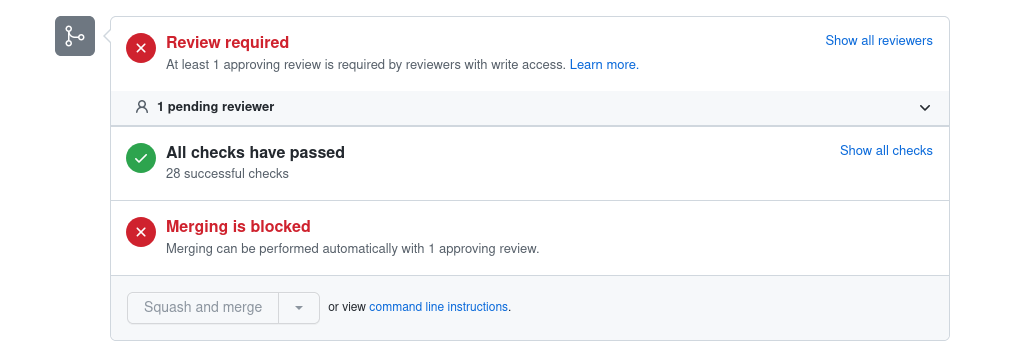
If you see some red checks, then something didn't work and you need to take some action. Please check the tutorial again and fix the errors.
- Each tutorial name starts with a number. If you create a new tutorial, its name should start with the number following the last tutorial.
- Separate words in the title with an
_underscore. - Use a short descriptive name for the filename, for example: 22_creating_a_summarizer_pipeline.