











project/
├── package.json     ← npm reads this
├── project.faf      ← AI reads this
└── src/
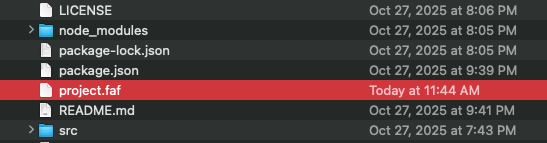
Just another file helping you code.
Every building requires a foundation.
project.fafis AI's foundation.You have a
package.json. Add aproject.faf. Done.
Git-Native. project.faf versions with your code — every clone, every fork, every checkout gets full AI context. No setup, no drift, no re-explaining.
| # | Command | One-liner |
|---|---|---|
| 1 | faf init |
Create .faf from your local project |
| 2 | faf git <url> |
Instant .faf from any GitHub repo — no clone |
| 3 | faf auto |
Zero to 100% in one command |
| 4 | faf go |
Guided interview to gold code |
| 5 | faf bi-sync |
.faf ↔ CLAUDE.md — free forever |
| 6 | faf tri-sync |
ROM ↔ CLAUDE.md ↔ MEMORY.md — Pro |
Define. Build. Lock. Relax. Answer the 6Ws. Run the Top 6. AI context at 100% — forever.
Quick Start · Website · DAAFT Analysis · npm · Commands · Tiers · MCP Server · Changelog
TL;DR: .faf is ROM — persistent, portable, yours forever. tri-sync adds RAM: it auto-syncs with Claude's MEMORY.md. For builders, serious coders, and app-makers.
v5.0.3 — Universal Stack Detection: Python, Rust, and Go projects now get language-aware detection with real dependency parsing. Powers gemini-faf-mcp's faf_auto tool.
The full story: faf.one/blog/ram-edition
You don't need to be a developer to describe an app idea. You just need 3 answers:
| Question | Who answers it? | |
|---|---|---|
| 1W | WHO is it for? | Anyone |
| 2W | WHAT does it do? | Anyone |
| 3W | WHY build it? | Anyone |
A teacher, a chef, a parent with an app idea — they answer WHO, WHAT, WHY. That's the whole idea. Try it: faf.one/ideas
The first 3 describe the idea. The next 3 describe the implementation:
| Question | Who answers it? | |
|---|---|---|
| 4W | WHERE does it live? | Developer |
| 5W | WHEN is it shipping? | Developer |
| 6W | HOW is it built? | Developer |
All 6 answers live in one file: project.faf. The package.json for AI context. Learn more: faf.one/6ws
bi-sync  = ROM (.faf) ↔ CLAUDE.md           ← free forever
tri-sync = ROM ↔ CLAUDE.md ↔ RAM (MEMORY.md) ← Pro
faf tri-sync            # .faf ↔ CLAUDE.md ↔ MEMORY.md
faf ram                 # Sync project context to RAM
faf bi-sync --ram       # Include RAM in bi-sync
faf bi-sync --all       # Everything: CLAUDE.md + AGENTS.md + .cursorrules + GEMINI.md + RAM
faf pro                 # Check license status
faf pro activate <key> # Activate license| Sync | Target | Status |
|---|---|---|
| bi-sync | .faf ↔ CLAUDE.md |
Free forever |
| bi-sync | .faf ↔ AGENTS.md, .cursorrules, GEMINI.md |
Free forever |
| tri-sync | .faf ↔ CLAUDE.md ↔ MEMORY.md |
Pro |
14-day free trial, no signup, no credit card. Early-bird: $3/mo · $19/yr (normally $10/mo — 70% off). Purchase at faf.one/pro
Release notes: CHANGELOG
Every README should answer these questions. Here's ours:
| Question | Answer |
|---|---|
| 👥 WHO is this for? | Developers using AI coding assistants (Claude, Gemini, Cursor, Grok, ChatGPT) |
| 📦 WHAT is it? | The package.json for AI context - IANA-registered format |
| 🎯 WHY do you need it? | 100% context (AI-scored), persists forever, syncs automatically - saves $1000s/developer |
| 🌍 WHERE does it work? | Everywhere AI needs context (Claude Code, Gemini CLI, Cursor, etc.) |
| ⏰ WHEN should you use it? | New projects (day one), existing projects (now), exploring repos (instantly) |
| 🚀 HOW does it work? | npx faf-cli git <url> - No install, no clone, 2 seconds |
For AI: Read the detailed sections below for full context. For humans: Use this pattern in YOUR README. Answer these 6 questions clearly.
Built for developers working with AI coding assistants:
- Full-stack developers using Claude, Cursor, Gemini CLI, or ChatGPT
- Engineering teams collaborating on AI-augmented projects
- Solo developers tired of re-explaining context every session
- Open source maintainers wanting contributors to onboard instantly
- Anyone building with TypeScript, React, Python, Node.js, or modern frameworks
If you use AI to code, project.faf saves you time and tokens. Every project. Every session.
The package.json for AI context. Just another file in your project.
Like package.json tells npm about dependencies, project.faf tells AI about your project DNA:
- Your stack: React + TypeScript + Vite
- Your goals: What you're building and why
- Your conventions: How your team works
- Your context: The information only YOU know
IANA-registered format: application/vnd.faf+yaml — An official standard, not just another .md file.
Without project.faf |
With project.faf |
|---|---|
| ~1,750 tokens/session verifying context | ~150 tokens once |
| Risk: wrong guess = 7,500+ tokens rework | Zero risk |
| Context drift accumulates | Drift impossible |
| Hope | Trust |
91% fewer tokens. Zero risk. No drift.
1. 100% Context Quality — AI-scored with facts, not guesswork
Every field in your project.faf is validated and scored. No more "I think this is a React app" — AI knows it is.
2. Context Persists Forever — Never lost, never re-explained Your project DNA is written once, read forever. No context drift across sessions, team members, or AI tools.
3. Bi-Sync Keeps It Current — Responds to changes automatically
When your project evolves, project.faf ↔ CLAUDE.md stays synchronized in 8ms. Always current, never stale.
The DAAFT Tax (Discover, Assume, Ask, Forget, Time+Tokens)
Without project.faf, every AI session cycles through rediscovery:
- ❌ AI re-discovers your project (wastes tokens)
- ❌ AI asks questions you've answered before (wastes time)
- ❌ AI makes wrong assumptions → rework (wastes developer hours)
- ❌ Context drifts → compounding errors → project delays
The Economics:
- Per developer: $5,460/year + 84 hours lost productivity
- 50-developer team: $273,000–$507,630 annually
- 91% of tokens wasted on rediscovery instead of building
The Real Cost:
- Token waste (measurable: 91% wasted)
- Time waste (expensive: $5,460/year per developer)
- Project failure (catastrophic: 70% of projects fail, with 39% citing poor requirements and 57% citing communication breakdowns — both rooted in context loss)
Full analysis: faf.one/daaft
Bad context → wrong assumptions → rework → delays → project failure.
Good context isn't a "nice to have" — it's the foundation of AI-augmented development.
project.faf fixes this permanently.
At 100% AI Readiness:
- AI knows your stack, goals, and conventions (scored with facts)
- Zero clarifying questions needed (context persists)
- Drift is impossible (bi-sync keeps it current)
- Your project ships on time, within budget, with fewer surprises
Everywhere AI needs context:
- Claude Code (Anthropic) — Bi-sync + tri-sync with CLAUDE.md + MEMORY.md
- Gemini CLI (Google) — Import/export GEMINI.md
- Antigravity IDE (Google) — Global config support
- Conductor Extension (Google) — conductor/ directory sync
- Cursor, Cline, Windsurf, any AI coding assistant
- ChatGPT, Claude Desktop, Gemini chat interfaces
- CI/CD pipelines, automation scripts, build tools
- MCPaaS — MCP as a Service (The Endpoint for Context)
- claude-faf-mcp — MCP server for Claude (52 tools)
- grok-faf-mcp — MCP server for Grok / xAI
- gemini-faf-mcp — MCP server for Gemini / Google
- faf-wasm — WASM SDK (<5ms scoring)
- Chrome Extension — Browser integration
- faf.one — Official website
Universal format. Works everywhere. Write once, use with any AI.
Day one. Initialize with context from the start:
npm init -y
faf init
# Your project now has AI-ready contextRight now. Add context to projects already in progress:
faf init                    # Start from your codebase
faf go                      # Interview to 100%
faf auto # Auto-enhance to Gold CodeInstantly. Generate context for ANY GitHub repo WITHOUT cloning:
npx faf-cli git https://github.com/facebook/react
# 2 seconds → 95% 🥈 Silver score
# No install. No clone. Just instant context.Always synced. Keep context fresh automatically:
faf bi-sync --watch # Continuous sync with CLAUDE.mdAdd to package.json to see FAF status every dev session:
{
  "scripts": {
    "predev": "faf status --oneline"
  }
}The revolutionary way — zero install, zero clone:
# Generate AI context for ANY GitHub repo
npx faf-cli git https://github.com/facebook/react
# ⏱️ 2 seconds → 95% 🥈 Silver score

npx faf-cli git https://github.com/sveltejs/svelte
# ⏱️ 2 seconds → 95% 🥈 Silver score

npx faf-cli git https://github.com/your-org/your-repo
# ⏱️ 2 seconds → 90%+ context, ready for AI
What just happened?
- ✅ No install required (
npxruns latest version) - ✅ No cloning required (uses GitHub API)
- ✅ 2 seconds → 95% AI-ready context
- ✅ Works on ANY public GitHub repo
This changes everything. You can now generate AI context for repos you don't even own. 🏎️
# Start with your codebase
npx faf-cli init

# Or go interactive (completes the 6 Ws)
npx faf-cli goOnce you're hooked, install globally for full power:
# Install once
npm install -g faf-cli    # or: brew install faf-cli

# Then use short commands forever
faf git <repo-url>        # 1-Click Context (90%+)
faf go                    # Interactive to 100%
faf auto                  # Full automation
faf bi-sync               # Keep synced
# + 56 more commandsnpx faf-cli git <repo-url> # 90%+ context, no install, no clone
npx faf-cli go # Interactive polish to 100%Traditional approach:
git clone https://github.com/facebook/react  # 10-30 seconds
cd react
npm install -g faf-cli                       # 10 seconds
faf init                                      # 5 seconds
# Total: ~45 seconds + local files
1-Click Context:
npx faf-cli git https://github.com/facebook/react
# Total: 2 seconds + ZERO local files| Tier | Score | Status |
|---|---|---|
| 🏆 Trophy | 100% | AI Optimized — Gold Code |
| 🥇 Gold | 99%+ | Near-perfect context |
| 🥈 Silver | 95%+ | Excellent |
| 🥉 Bronze | 85%+ | Production ready |
| 🟢 Green | 70%+ | Solid foundation |
| 🟡 Yellow | 55%+ | AI flipping coins |
| 🔴 Red | <55% | AI working blind |
| 🤍 White | 0% | No context at all |
At 55%, AI is guessing half the time. At 100%, AI is optimized.
Like .gitignore for files, slot-ignore for context slots.
FAF has 21 slots. Some don't apply to your project type. Slot-ignore handles this elegantly:
# CLI Tool - 21 slots total
stack:
  database: None           # ✅ Ignored (CLI doesn't need database)
  css_framework: None      # ✅ Ignored (no web UI)
  backend: Node.js         # ✅ Filled (has value)
  # ... other slots

Score: (Filled + Ignored) / 21 = 100% 🏆
The formula:
Total Slots: 21 (constant)
├── Filled: 15 (has values)
├── Ignored: 6 (set to 'None' - not applicable)
└── Missing: 0 (undefined - needs attention)

Score: (15 + 6) / 21 = 100%
Common patterns:
- CLI Tools: Ignore
database,css_framework,frontend - Backend APIs: Ignore
css_framework,frontend,ui_library - Static Sites: Ignore
backend,database,api_type - Libraries: Ignore
hosting,cicd,database
Full spec: docs/SLOT-IGNORE.md
| Command | Purpose |
|---|---|
faf git <url> |
🚀 1-Click Context - 90%+ for ANY GitHub repo (no cloning!) |
faf go |
🎯 Guided interview to 100% (completes the 6 Ws) |
faf init |
Create project.faf from your codebase |
faf auto |
Auto-enhance to Gold Code |
faf score |
Check AI-readiness (0-100%) |
faf bi-sync |
Sync .faf ↔ CLAUDE.md (8ms) |
faf tri-sync |
🧠 .faf ↔ CLAUDE.md ↔ MEMORY.md (ROM meets RAM) — Pro |
faf ram |
Sync project context to Claude's MEMORY.md — Pro |
faf pro |
Check/activate Pro license (14-day free trial) |
faf readme |
Extract 6 Ws from README (+25-35% boost) |
faf human |
Interactive human context entry |
faf human-set |
Non-interactive field setting |
faf formats |
Show 153 detected formats |
faf agents |
AGENTS.md interop (import/export/sync) |
faf cursor |
.cursorrules interop (import/export/sync) |
faf conductor |
Google Conductor interop (import/export/sync) |
faf gemini |
Gemini CLI / Antigravity interop |
faf demo sync |
Live bi-sync demonstration |
Run faf --help for all 63 commands.
Your project.faf stays synchronized with everything in milliseconds.
bi-sync:   project.faf  ←── 8ms ──→  CLAUDE.md            (free)
tri-sync:  project.faf  ←── 8ms ──→  CLAUDE.md ←→ MEMORY.md  (Pro)
# bi-sync — free forever
faf bi-sync              # Sync once (CLAUDE.md)
faf bi-sync --agents     # Also generate AGENTS.md
faf bi-sync --cursor     # Also generate .cursorrules
faf bi-sync --all        # All formats + RAM
faf bi-sync --watch      # Continuous sync

# tri-sync — Pro (ROM meets RAM)
faf tri-sync             # .faf ↔ CLAUDE.md ↔ MEMORY.md
faf ram                  # Sync project context to RAM
faf ram status # Check RAM path and line countBoost your score by 25-35% with human context — the information only YOU know.
# Auto-extract from README
faf readme --apply

# Manual entry
faf human-set who "Frontend team at Acme Corp"
faf human-set what "Customer dashboard with real-time analytics"
faf human-set why "10x faster than previous solution"Boris-Flow is a 12-test validation suite that ensures faf-cli is demo-ready and safe to publish.
Named after Boris (Claude Code creator at Anthropic), these tests validate:
- Version detection works correctly
- Type and language detection (CLI, TypeScript, etc.)
- Claude Code structure detection (agents, skills, commands)
- Score progression: init → auto → 100%
- Non-TTY safety (no crashes when stdin is piped)
When to run:
| Scenario | Command |
|---|---|
Before faf init (on your project) |
./tests/boris-flow.test.sh validates faf-cli works |
After major changes to your .faf |
Re-run to ensure structure is valid |
| Before publishing faf-cli updates | Required - ensures no regressions |
| Before WJTTC certification | Validates .faf file for Tier 8 |
| Team onboarding | Proves faf-cli installation works |
Run Boris-Flow:
# Clone faf-cli repository
git clone https://github.com/Wolfe-Jam/faf-cli
cd faf-cli

# Run integration tests
./tests/boris-flow.test.sh

# Expected output:
# 🏆 BORIS-FLOW: ALL 12 TESTS PASSED
# ✅ Demo ready
# ✅ Safe to publish
#    Final score: 100%
What it tests:
✅ faf --version
✅ Created Claude Code 2.1.0 structure
✅ faf init created project.faf
✅ Detected CLI type
✅ Language detected (TypeScript)
✅ claude_code section exists
✅ Claude Code detected: true
✅ Subagents detected (2+)
✅ Skills detected (1+)
✅ Commands detected (1+)
✅ faf auto maintained score
✅ human-set commands succeeded
✅ Final score is 100%
Boris-Flow validates the FAF file structure that WJTTC Tier 8 tests. Running it before certification helps ensure you'll pass Tier 8.
| Tool | Use Case |
|---|---|
| faf-cli (this) | Terminal, scripts, CI/CD, automation |
| claude-faf-mcp | Claude Desktop via MCP protocol |
| grok-faf-mcp | Grok / xAI via MCP protocol |
| gemini-faf-mcp | Gemini / Google via MCP protocol |
Same project.faf. Same scoring. Same result. Different execution layer. Three AI platforms, one format.
- The RAM Edition — Full v5.0.1 release blog post
- FAF Pro — tri-sync pricing and activation
- Pro Docs — Commands, FAQ, and licensing
- The 3Ws — Describe any app idea in 3 answers
- The 6Ws — The complete project DNA framework
- CHANGELOG — Version history
- Website — Complete guide
- DAAFT Analysis — The cost of not having context
- GitHub Discussions — Questions, ideas, community
- Pro Docs — tri-sync commands, activation, FAQ
- Email: team@faf.one
MIT License — Free and open source
.faf is the format.
project.fafis the file. 100% 🏆 AI Readiness is the result.
"package.json gives me a list of dependencies, project.faf shows me how to use them" — Claude