Releases: codepointerapp/codepointer
v0.1.1


Full Changelog: v0.1.0...v0.1.1
February 2026 - release 0.1.1 - Not on my watch

Application is back again in github. When migrating the application to this
new owner - account was disabled. This happened in Christmas, so timing was
not ideal as most support was in vacation. Things got sorted out eventually.
New months main new feature is a terminal dock (available by pressing
control+t. This works on Linux and Windows, using your default shell.
The global search got minor updates as well. Git plugin should be more reliable.
Code mirror is available at https://gitlab.com/codepointer/codepointer
Download mirror is available here: https://dappcdn.com/download/devtools/codepointer
Changelog
- Search: close all - #157
- Search: support for more search options - #158
- Need a proper terminal - #159
- Make the colors change when application is not active. - 1c49cec
- Command Palette: moving to first item is not always possible - diegoiast/command-palette-widget#5
- Qutepart: Comment command does not work with multiple cursors - diegoiast/qutepart-cpp#63
- qmdiSplitTabWidget: unmerge client when split looses focus - 4f90cc9
- git diff fails - #161
v0.1.1-rc2
Full Changelog: v0.1.0...v0.1.1-rc2
February 2026 - release 0.1.1-rc2 - Instant Flavor
Application is back again in github. When migrating the application to this
new ownwer - account was disabled. This happened in Chrimtmass, so timing was
not ideal as most support was in vacation. Things got sorted out eventually.
New months main new feature is a terminal dock (available by pressing
control+t. This works on Linux and Windows, using your default shell.
The global search got minor updates as well.
Code mirror is available at https://gitlab.com/codepointer/codepointer
Download mirror is available here: https://dappcdn.com/download/devtools/codepointer
Changelog
- Search: close all - #157
- Search: support for more search options - #158
- Need a proper terminal - #159
- Make the colors change when application is not active. - 1c49cec
- Command Palette: moving to first item is not always possible - diegoiast/command-palette-widget#5
- Qutepart: Comment command does not work with multiple cursors - diegoiast/qutepart-cpp#63
- qmdiSplitTabWidget: unmerge client when split looses focus - f1c8bc6
v0.1.1-beta1
Full Changelog: v0.1.0...v0.1.1-rc1
February 2026 - release 0.1.1-rc1 - Instant Flavor
Application is back again in github. When migrating the application to this
new ownwer - account was disabled. This happened in Chrimtmass, so timing was
not ideal as most support was in vacation. Things got sorted out eventually.
New months main new feature is a terminal dock (available by pressing
control+t. This works on Linux and Windows, using your default shell.
The global search got minor updates as well.
Mirror is available at https://gitlab.com/codepointer/codepointer .
Changelog
January 2026 - release 0.1.0 - Instant Flavor

Application got renamed to CodePointer. Releases, also have
a cool fun name, which really has no meaning.
Application got a new UI, by default all docks will be hidden.
The application also has a new main menu, on the side of the tabs.
A new plugin for git integration is work in progress, so far
you can see git log (for project, or single file). Integration will
get better on newer versions.
Important keyboard shortcuts you need to know:
control+shift+pbrings up the command pallete. You can choose which
menu actions to execute. Think of it, as a command line for this UI.control+pbrings up the list of files in the currently open project.alt+control+m- toggles the new UI, and a traditional one.control+b- executes the active task of the current project.alt+#-#is a number, will select the corresponding tab.control+#- will select, or hide a dock.control+shift+f- opens the search panel.control+g, f- show git log from current filecontrol+g, l- show git log from repository, of current filecontrol+g, d- show git diff of current file
Changelog
- qmdiEditor: better saves - #140
- ProjectManager: when opening a project, ensure the dock is visible - #136
- Filemanager: file properties not working on ZorinOS - diegoiast/qmdilib#29
- Qutepart/Theme: changing themes on the fly no longer works #59 diegoiast/qutepart-cpp#59
- Search: when searching globally - if selected, use text - #141
- ProjectManager: hello.sh - #137
- Wayland is broken - github.com//issues/142
- Fix deprecation warning: diegoiast/command-palette-widget#6
- Qutepart: Indentation is broken if we indent from start of line #62 - diegoiast/qutepart-cpp#62
- Started working on flatpack releases. Not upstream yet.
- New welcome page
- git: git integration
Downloads also available here: https://dappcdn.com/download/devtools/codepointer
Gitlab mirror: https://gitlab.com/codepointer/codepointer/
v0.0.16
Full Changelog: v0.0.15...v0.0.16
December 2025 - release
A simple release for the end of the year. Mainly small bug fixes, and stability.
The only new feature is control+# (# is a number) will show/hide/select a docked
widget. Which is actually very helpful - if you press control+1/2/3 - you can hide
all docks and have a simple text editor.
Changelog
- qmdieidtor: markdown preview does not work - #133
- qmdiServer: cannot abort closing all tabs - diegoiast/qmdilib#27
- qmdiEditor: better saving on close - #130
- Folding: minimap is not updated when folding changes - diegoiast/qutepart-cpp#57
- Editor: display changes too much when switching editors - diegoiast/qutepart-cpp#58
- PluginManager: shortcuts for showing docks - diegoiast/qmdilib#28
- Editor: crash when closing adject tab - #128
- Minimap: current line is no longer updated - diegoiast/qutepart-cpp#56
- Project manager: copy relative file to the project - #7
- When moving tabs to a new split, other tabs are lost sometimes - #131
- SplittabWidget: clicking on empty area creates a new file on the wrong split - #132
- ProjectManager: search project description is broken - #134
v0.0.16-rc1
Full Changelog: v0.0.15...v0.0.16-rc1
December 2025 - release
A simple release for the end of the year. Mainly small bug fixes, and stability.
The only new feature is control+# (# is a number) will show/hide/select a docked
widget. Which is actually very helpful - if you press control+1/2/3 - you can hide
all docks and have a simple text editor.
Changelog
- qmdieidtor: markdown preview does not work - #133
- qmdiServer: cannot abort closing all tabs - diegoiast/qmdilib#27
- qmdiEditor: better saving on close - #130
- Folding: minimap is not updated when folding changes - diegoiast/qutepart-cpp#57
- Editor: display changes too much when switching editors - diegoiast/qutepart-cpp#58
- PluginManager: shortcuts for showing docks - diegoiast/qmdilib#28
- Editor: crash when closing adject tab - #128
- Minimap: current line is no longer updated - diegoiast/qutepart-cpp#56
- Project manager: copy relative file to the project - #7
- When moving tabs to a new split, other tabs are lost sometimes - #131
- SplittabWidget: clicking on empty area creates a new file on the wrong split - #132
v0.0.15
Full Changelog: v0.0.14...v0.0.15
November 2025 - release
3 huge new features:
- We gained the ability to execute scripts. Any file which is executable on Unix,
or has an associated way for running (windows) will have a new icon (a small wheel) on the tab
and its menu will contain a new command "Run Script". Pressingcontrol+shift+rwill execute
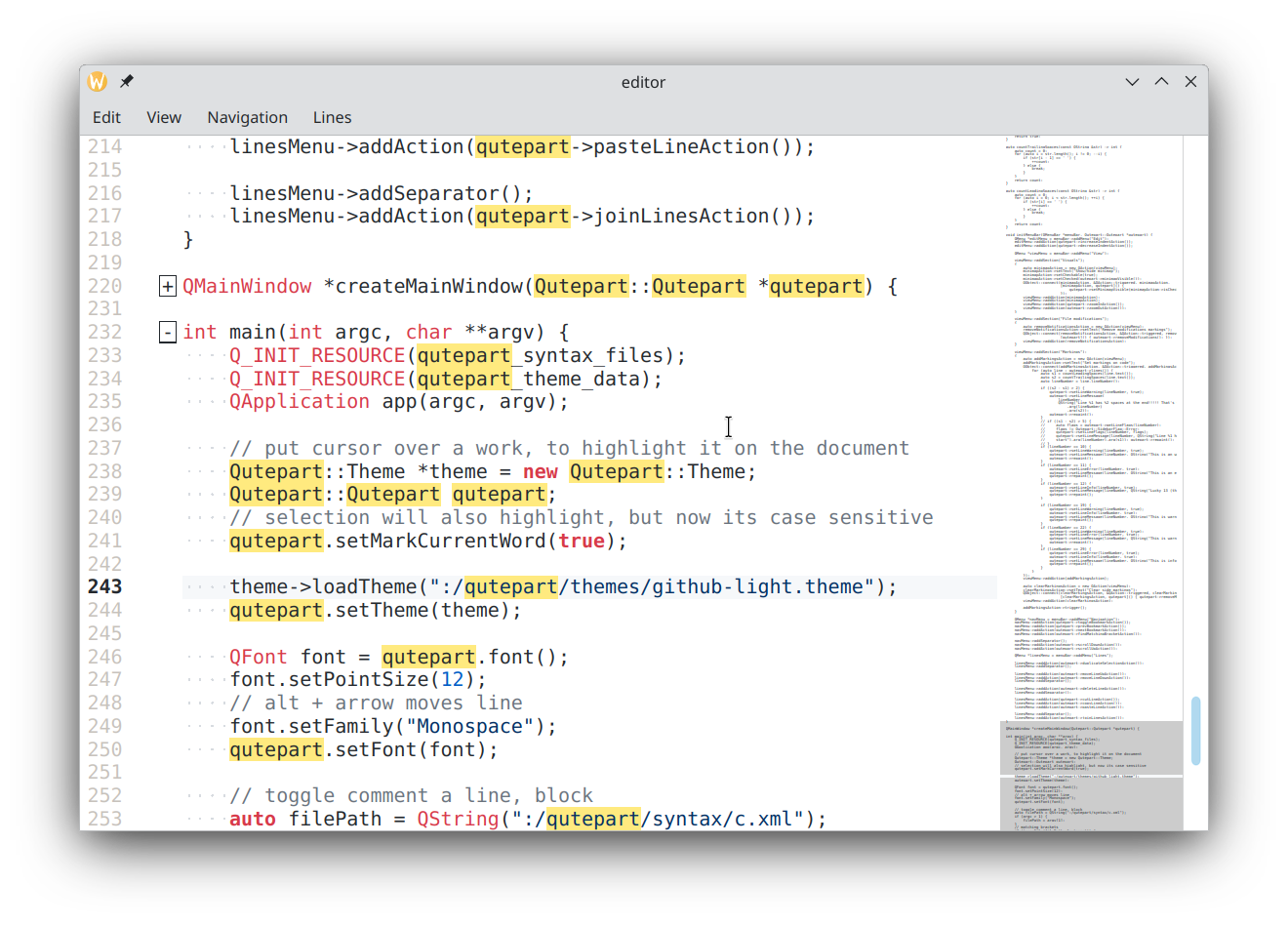
this file. This should be used to run local python, shell or other types of scripts. - Folding support. The editor now supports folding areas. This is a work in progress with
the following known issues: - Smart file finding in the command pallete. The algorythm should be similar to whats seen in
VScode or Sublime text (partial matching of file names, depending on path should work).
See the following commits to understand this feature:
diegoiast/command-palette-widget@246cd7b
diegoiast/command-palette-widget@6289e63
Changelog
- Project manager: run scripts - #5
- Project manager: Open CMakLists.txt file - does not open a project - #122
- Qutepart: Add support for folding areas - diegoiast/qutepart-cpp#19
- Command pallete: When searching commands - we should ignore accelerators - diegoiast/command-palette-widget#4
v0.0.15-rc1
Full Changelog: v0.0.14...v0.0.15-rc1
November 2025 - release
3 huge new features:
- We gained the ability to execute scripts. Any file which is executable on Unix,
or has an associated way for running (windows) will have a new icon (a small wheel) on the tab
and its menu will contain a new command "Run Script". Pressingcontrol+shift+rwill execute
this file. This should be used to run local python, shell or other types of scripts. - Folding support. The editor now supports folding areas. This is a work in progress with
the following known issues: - Smart file finding in the command pallete. The algorythm should be similar to whats seen in
VScode or Sublime text (partial matching of file names, depending on path should work).
See the following commits to understand this feature:
diegoiast/command-palette-widget@246cd7b
diegoiast/command-palette-widget@6289e63
Changelog
- Project manager: run scripts - #5
- Project manager: Open CMakLists.txt file - does not open a project - #122
- Qutepart: Add support for folding areas - diegoiast/qutepart-cpp#19
- Command pallete: When searching commands - we should ignore accelerators - diegoiast/command-palette-widget#4
v0.0.14
Full Changelog: v0.0.13...v0.0.14
October 2025 - release
A maintanence release, no big updates.
Selections are restored in opened files. Unsaved files are restored without saving (they
are actually saved to a temp location). You can modify the console fonts. Cargo bugs
are finally fixed. Copying a full document works as expected.
From now on, CMake dependencies will locked with sha1, instead of following a branch. This will help reproducibility.
Changelog
- Meta: Save IDE state more periodically - #124
- Completer: an empty line at the end - diegoiast/qutepart-cpp#36
- ProjectManager: target run is hard to find - #98
- Text editor: Save content of unnamed files - #19
- Indenter::indentBlock(): use Qt::key instead of QChar - diegoiast/qutepart-cpp#45
- File manager: right click on dir - add as project - #11
- Project Manager: output should follow editor console - #111
- Projectmanager: QProcess::openChannels: Inconsistent stderr channel configuration - #119
- ProjectManager: cargo projects have no executables - #115
- Editor: copying all lines does not add new line - diegoiast/qutepart-cpp#47
v0.0.14-rc2
Full Changelog: v0.0.13...v0.0.14-rc2
October 2025 - release
A maintanence release, no big updates.
Selections are restored in opened files. Unsaved files are restored without saving (they
are actually saved to a temp location). You can modify the console fonts. Cargo bugs
are finally fixed. Copying a full document works as expected.
CMake dependencies are not locked with sha1, instead of following a branch. For reproducibility.
Changelog
- Meta: Save IDE state more periodically - #124
- Completer: an empty line at the end - diegoiast/qutepart-cpp#36
- ProjectManager: target run is hard to find - #98
- Text editor: Save content of unnamed files - #19
- Indenter::indentBlock(): use Qt::key instead of QChar - diegoiast/qutepart-cpp#45
- File manager: right click on dir - add as project - #11
- Project Manager: output should follow editor console - #111
- Projectmanager: QProcess::openChannels: Inconsistent stderr channel configuration - #119
- ProjectManager: cargo projects have no executables - #115
- Editor: copying all lines does not add new line - diegoiast/qutepart-cpp#47