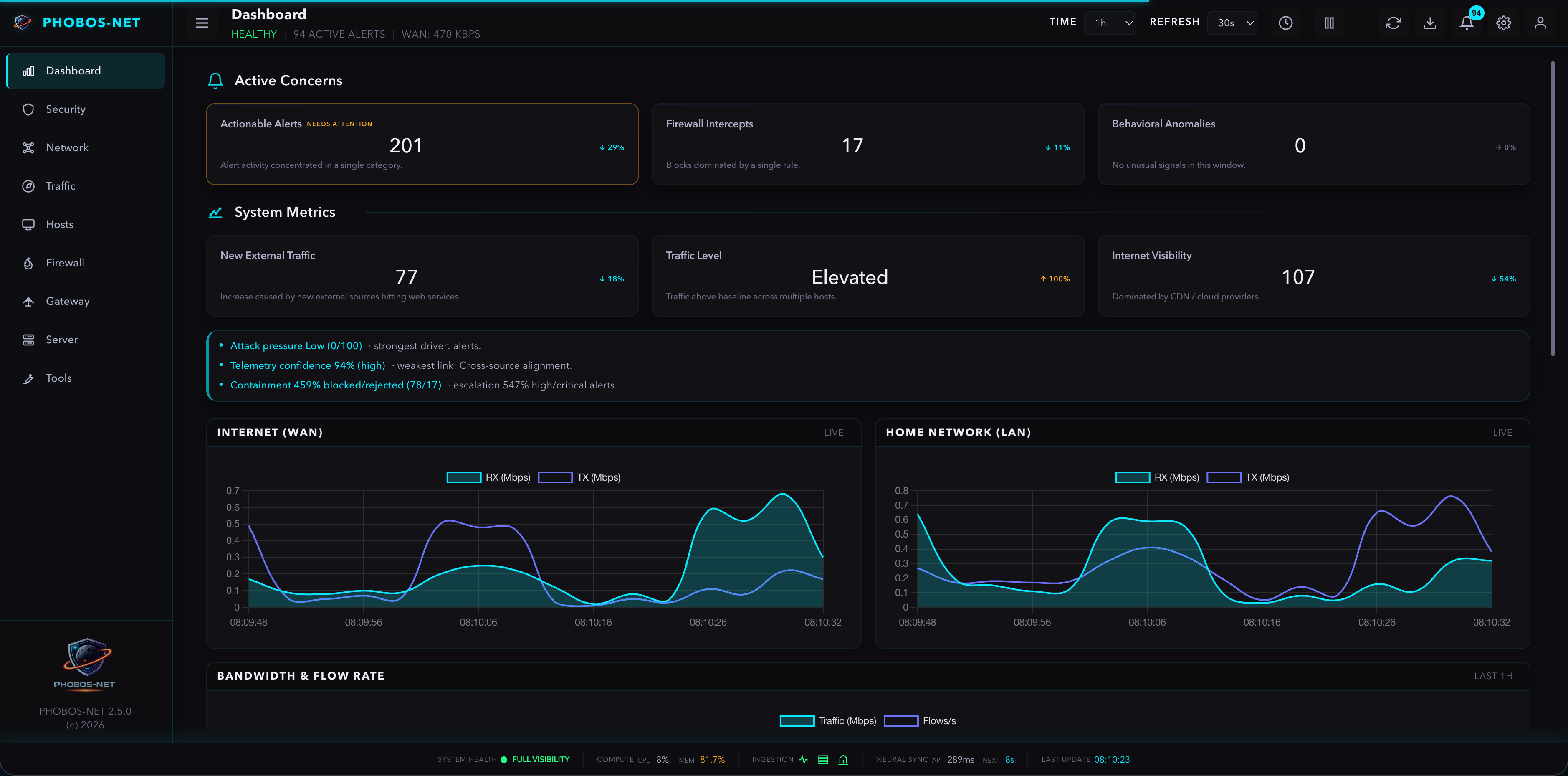


PHOBOS-NET is a self-hosted, read-only network observability platform designed for operators who value truth, clarity, and calm UX over automation and alert noise.
It combines NetFlow, OPNsense firewall logs, and SNMP into a single, explainable view of network behavior.
No blocking.
No enforcement.
No guessing.
Just accurate visibility.
PHOBOS-NET is intentionally conservative by design:
- Observational, not reactive
- Truth over completeness
- Signals ≠ alerts
- Health reflects operability, not attacks
If data is unavailable, PHOBOS-NET shows UNKNOWN / — instead of inferring values.
- Flow-level visibility via
nfdump - Time-range aware queries (48h default)
- No flow deduplication or inference
- RFC-compliant
filterlogparsing - Normalized
pass / block / rejectevents - IPv4 and IPv6 support
- Separate syslog streams supported (UDP 514 / 515)
- CPU, memory, and interface metrics
- Authoritative counters (
ifTable/ifXTable) - Explicit availability tracking
If WAN/LAN live widgets do not match the gateway labels, set
SNMP_WAN_NAME/SNMP_LAN_NAME(orSNMP_WAN_IFINDEX/SNMP_LAN_IFINDEX).
Threat timeline persistence: recent threat activity is stored in /app/data/threat-timeline.json so threat panels survive container restarts. Override the path with THREAT_TIMELINE_PATH if needed. Alerts persist in /app/data/alerts.db (SQLite).
- System Health reflects monitoring operability only
- Alerts require strict escalation and persistence
- Indicators provide context without triggering alarms
Dockerhub: https://hub.docker.com/r/legato3/phobos-net
The fastest way to deploy PHOBOS-NET is using Docker Compose.
For a step-by-step walkthrough, see: docs/USER_GUIDE.md
- Create
docker-compose.yml:
services:
  phobos-net:
    image: legato3/phobos-net:latest
    container_name: phobos-net
    restart: unless-stopped
    ports:
      - "3434:8080"      # Web UI
    environment:
      - TZ=UTC # Set to your timezone
      - NFCAPD_INTERVAL=15
      - PHOBOS_ROLE=web
      - PHOBOS_DISABLE_BACKGROUND=1
      - PHOBOS_SHARED_STATE_DIR=/app/data/.shared
    volumes:
      - ./docker-data:/app/data
      - ./docker-data/nfdump:/var/cache/nfdump

  phobos-net-worker:
    image: legato3/phobos-net:latest
    container_name: phobos-net-worker
    restart: unless-stopped
    cap_add:
      - NET_RAW
    ports:
      - "514:5514/udp"   # Firewall Logs (OPNsense)
      - "515:5515/udp"   # App/Syslog
      - "2055:2055/udp"  # NetFlow (nfcapd)
    environment:
      - TZ=UTC # Set to your timezone
      - NFCAPD_INTERVAL=15
      - PHOBOS_ROLE=worker
      - PHOBOS_SHARED_STATE_DIR=/app/data/.shared
    volumes:
      - ./docker-data:/app/data
      - ./docker-data/nfdump:/var/cache/nfdump
    entrypoint: ["/app/docker-worker-entrypoint.sh"]
Minimum required settings
TZin compose- OPNsense targets set (NetFlow + Syslog) to the worker ports
- SNMP Host + Community set in Settings (for Gateway widgets)
- NetFlow retention configurable in Settings (default 7 days)
If you’re on macOS/Windows (Docker Desktop):
Privileged UDP ports can be unreliable. If syslog widgets stay empty, publish and target 5514/5515 instead:
  phobos-net-worker:
    ports:
      - "5514:5514/udp"
      - "5515:5515/udp"
      - "2055:2055/udp"
OPNsense targets (quick reference):
- NetFlow →
<host-ip>:2055 - Syslog filterlog →
<host-ip>:514(or5514if using Docker Desktop workaround) - Syslog app/system →
<host-ip>:515(or5515if using Docker Desktop workaround)
- Launch:
docker compose config
docker compose up -dPHOBOS-NET is observational; it needs data to show anything. Verify your setup in 5 steps:
- Open UI & Login: Access
http://localhost:3434.- Default Credentials:
admin/phobos-net - Important: These are bootstrap credentials. Rotate them immediately in non-lab environments.
- Use the top-right Operator menu to change the password after first login.
- Default Credentials:
- Configure SNMP: Open Settings (top-right) and set SNMP Host + SNMP Community to match OPNsense.
- Configure Syslog Filter (Optional): On Linux Docker hosts, set Firewall IP (Syslog) to your firewall IP if you want to accept syslog only from that host. On Docker Desktop (macOS/Windows), keep it blank (or
FIREWALL_IP=0.0.0.0) because UDP source IP may be rewritten before it reaches the container. IfFIREWALL_IPis set in Docker, it overrides the UI. - Confirm Syslog: Go to the Firewall tab. If OPNsense is configured, you should see logs appearing within 60 seconds.
- Confirm NetFlow: Go to the Network tab. By default
nfdumprotates every 15 seconds; for live bandwidth, set OPNsense Active/Inactive timeouts to 15s/5s and setNFCAPD_INTERVAL=15in your compose file.
SNMP, Syslog, and NetFlow must be configured on your gateway.
See: docs/OPNSENSE_CONFIG.md
For hardened deployments (worker split, TLS, backups, monitoring), see: docs/PRODUCTION_GRADE.md
- Check UDP ports from the firewall (2055, 514/515 or 5514/5515).
- Check public liveness:
curl http://localhost:3434/health - Check login page availability:
curl -I http://localhost:3434/login - Check logs (both containers in split mode):
docker logs phobos-net --tail=200docker logs phobos-net-worker --tail=200
- If syslog is empty, verify Firewall IP (Syslog):
- Linux Docker host: set it to your firewall source IP (or leave blank).
- Docker Desktop (macOS/Windows): keep it blank or
0.0.0.0.
- For live bandwidth, set OPNsense Active/Inactive timeouts to 15s/5s and
NFCAPD_INTERVAL=15.
If Compose reports additional properties 'phobos-net-worker' not allowed, the service is likely mis-indented.
- Ensure both
phobos-netandphobos-net-workerare nested underservices:. - Validate before launching:
docker compose config.
On macOS/Windows Docker Desktop, privileged UDP forwarding to host 514/515 can be unreliable.
- Prefer publishing worker ports
5514:5514/udpand5515:5515/udp. - Point OPNsense Syslog targets to
<host-ip>:5514and<host-ip>:5515. - Keep
FIREWALL_IPunset (or0.0.0.0) on Docker Desktop. Docker may rewrite UDP source IP before container ingress, so strict source-IP filtering can block valid syslog packets.
NetFlow files can grow quickly. By default, PHOBOS-NET keeps 7 days of NetFlow files.
Adjust with NETFLOW_RETENTION_DAYS (set to 0 to disable cleanup). You can still prune manually if needed:
find ./docker-data/nfdump -type f -mtime +7 -delete- Authentication Required: Dashboard pages and operational APIs require a valid session.
- Role-Based Access: Admins can create users and assign roles (
admin,operator,viewer) from the Operator menu. - Public Probe Endpoints:
/healthand/metricsare intentionally unauthenticated for container/orchestrator health checks. - Bcrypt Hashing: Passwords are stored using industry-standard salted Bcrypt.
- Secure Headers: Strict Content Security Policy (CSP), HSTS, and XSS protection enabled by default.
- Non-Root Execution: Runs as a non-privileged user within Docker.
- Read-Only: No packet capture, no active response, no automated blocking.
PHOBOS-NET welcomes contributors who value correctness and calm UX.
Please read:
MIT License